VM Snapshots in qcontroller: Go Back to When Everything Worked
I do most of my work inside VMs, and I use qcontroller to manage their lifecycle. And while working, one inevitably breaks things - sometimes badly. When that happens, there are usually two options, both unpleasant: debug your way out, which can take ages, or revert your changes, which is sometimes not even possible because something implicit happened along the way - a package upgrade pulled in new dependencies, a config was rewritten by a tool, state accumulated somewhere you don’t know about.
There is another scenario where this hurts even more. Imagine you’re doing platform engineering: your platform is deployed into VMs, and you’re still developing it. Something goes wrong - and the only reliable way to recover is to redeploy the whole platform from scratch. In my case that is very time-consuming. What I really want in that moment is simple: go back to the point in time right after the deployment succeeded.
This is, of course, not a new idea. It’s called snapshots - and QEMU implements them really nicely. So I added them to qcontroller.
What a snapshot actually captures
QEMU’s internal snapshots store the complete state of a running VM - RAM, device state, and a copy-on-write disk snapshot - inside the VM’s qcow2 image itself. Restoring one doesn’t reboot the guest into an old disk; it resumes the machine exactly where it was, running processes and all. That’s precisely the “time travel” I wanted: snapshot right after a successful deployment, break things freely, jump back in seconds.
The modern way to drive this is the QMP job commands snapshot-save, snapshot-load and snapshot-delete - asynchronous jobs you kick off and then poll until they conclude. No deprecated HMP savevm involved.
The prerequisite: predictable disk names
There was one thing standing in the way. The snapshot commands don’t operate on “the VM” - they take explicit block device node names: which devices to snapshot, and which one holds the VM state. Up to now, qcontroller attached disks using the legacy -drive option (see my previous post for how it ended up on virtio-blk):
-drive file=disk.qcow2,if=virtio,format=qcow2
With -drive, QEMU auto-generates an opaque node name like #block123 - you’d have to query and guess at runtime. The fix was to switch to the modern -blockdev/-device pair, which lets you choose the node name:
-blockdev driver=file,node-name=disk0-file,filename=disk.qcow2
-blockdev driver=qcow2,node-name=disk0,file=disk0-file
-device virtio-blk,drive=disk0,id=virtio-disk0
Now every instance has its OS disk under the stable, predictable name disk0. The change landed in PR #21.
With that in place, the rest was easy
Once the disk had a known name, the snapshot feature was mostly plumbing: four new RPCs threaded through qcontroller’s existing layers (REST -> orchestrator -> controller -> qemu service -> QMP), exposed as:
POST   /v1/nodes/{node}/instances/{name}/snapshots            # save
GET    /v1/nodes/{node}/instances/{name}/snapshots            # list
POST   /v1/nodes/{node}/instances/{name}/snapshots/{tag}/load # restore
DELETE /v1/nodes/{node}/instances/{name}/snapshots/{tag}      # delete
Save, restore and delete are asynchronous: the API returns immediately and the outcome arrives over qcontroller’s event stream, which the web UI uses to show progress and results in a new Snapshots tab on each instance:
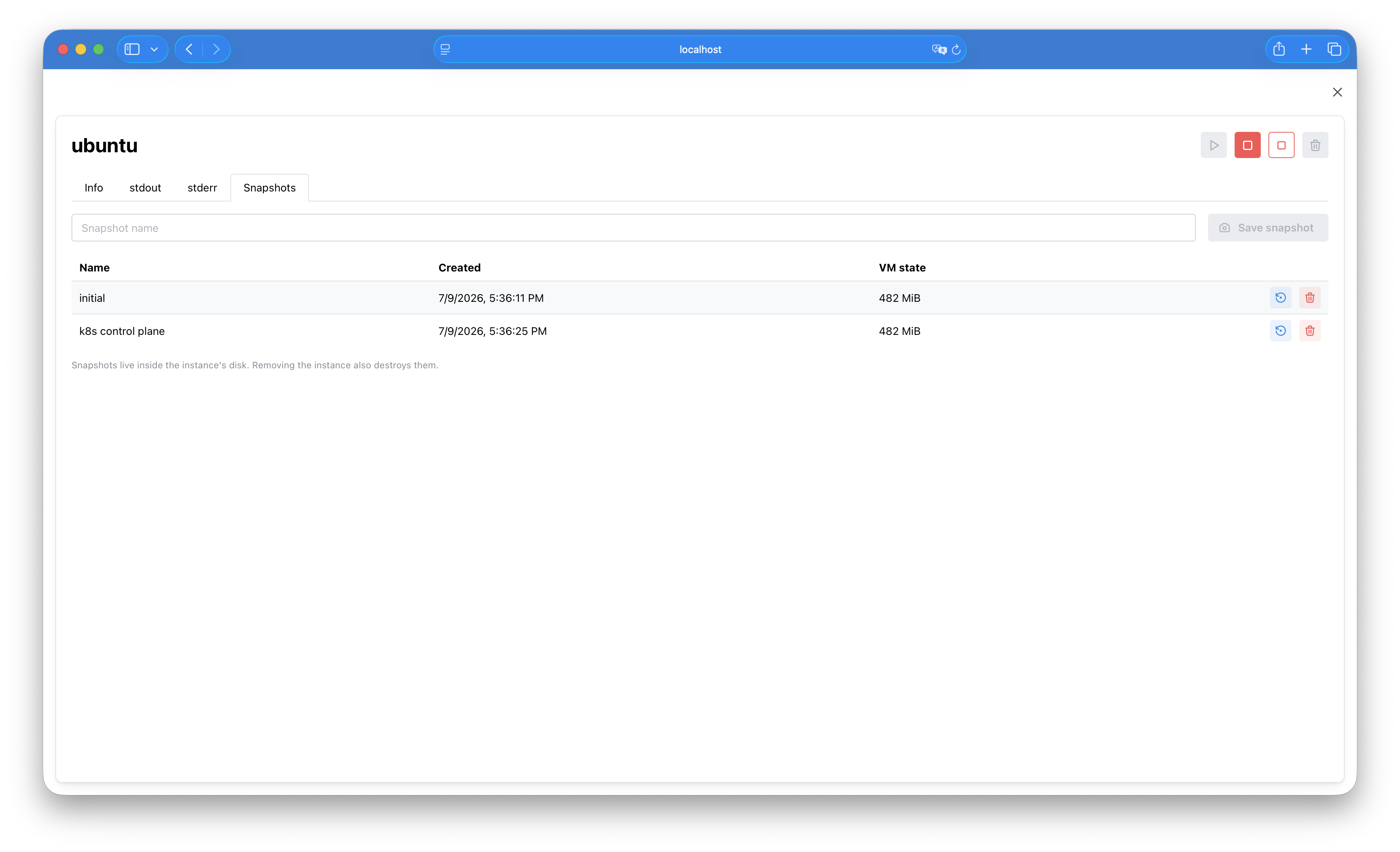
A couple of properties follow directly from how internal snapshots work and are worth knowing:
- They require a running VM - these are live QMP operations.
- A snapshot of a 1 GB VM takes roughly 15-30 seconds to save (it writes all of the guest’s RAM), and restore visibly pauses the guest for a few seconds while state is loaded back.
- Snapshots live inside the instance’s qcow2 image - remove the instance and its snapshots go with it.
The implementation is in PR #50 if you want the details.
Takeaway
Snapshot right after things work, experiment without fear, restore when they don’t. Enjoy snapshotting your work - it saves time and nerves.